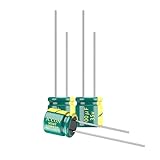
You now know how to solder capacitors, flash firmware, and 3D print latches. You possess knowledge that 99% of the population lacks.
To the average person, a Neato XV that beeps and stops is “broken trash.”
To you, it is a $20 asset that just needs a $2 O-ring.
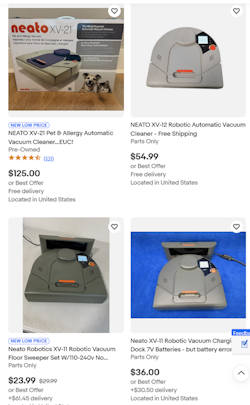
If you want to keep your Neato running forever—or build a fleet of them for every floor of your house—you need spare parts. And the cheapest way to get parts is to buy Neato for parts repair units on eBay, Goodwill, or Facebook Marketplace.
Here is the ultimate guide to spotting “Gold” (easy fixes) vs. “Fool's Gold” (money pits).
Table of contents
The “Green Flags”: Buy These immediately 🟢
These descriptions usually indicate a robot that is mechanically perfect but has a minor consumable failure.
1. “Runs for 5 minutes then stops” / “Needs New Battery”
- The Real Issue: The NiMH batteries are dead.
- The Fix: You were going to upgrade to a Lithium-Ion battery anyway.
- Verdict: BUY. You get a working motherboard, Lidar, and wheels for the price of shipping.
2. “Error 3000” / “Vision Blocked”
- The Real Issue: The seller thinks the laser is broken. We know it's just the $2 rubber belt.
- The Fix: A $2 O-ring and 15 minutes of work.
- Verdict: BUY. This is the most common and profitable flip.
3. “DOCK INCLUDED”
- The Strategy: Often, the charging dock alone is worth $30-$40 on eBay.
- Verdict: If you see a listing for a “broken” robot with a dock for under $40, buy it. Even if the robot is crushed by a tank, the dock pays for the purchase.


The “Yellow Flags”: Proceed with Caution 🟡
1. “Dim Screen” / “No Display”
- The Issue: The Neato XV LCD screens are notorious for fading or going blank.
- The Fix: You can buy replacement LCDs from AliExpress (~$15), but soldering them can be tricky.
- Verdict: Good for parts, but annoying if you want to use it as a primary cleaner. However, if you have the NeatoControl tool, you don't actually need the screen to schedule it!
2. “Bumper Stuck” / “Navigates Erratically”
- The Issue: Usually dust in the tactile switches or optical wall sensors.
- The Fix: A can of compressed air often fixes this.
- Verdict: A gamble, but usually pays off.
The “Red Flags”: Run Away 🔴
1. “No Power” (Even on Dock)
- The Issue: If the seller says “I put it on the charger and no lights come on,” it could be a blown F1 fuse on the motherboard or severe water damage.
- The Fix: Board-level microsoldering.
- Verdict: Hard pass unless you need wheel motors.
2. “Missing Dust Bin”
- The Issue: Replacement dust bins are surprisingly expensive ($25+) because they break so often.
- Verdict: Unless the robot is $5, skipping the bin makes it uneconomical to restore.
The “White Whale”: Finding the Cruz Board 🐳
If you want to do the Vorwerk Firmware Hack, you want the older Rev 113 “Cruz” motherboard.
How do you spot them in blurry eBay photos?
- Look at the Charging Contacts: Older models sometimes have slightly different contact pads.
- Look at the Label: If the model is XV-11 (Green) or XV-12 (Blue), it is almost certainly a Cruz board.
- Avoid: The “XV Signature” (Black) almost always has the newer, un-hackable Binky board.
Your Scavenging Toolkit
- eBay Saved Search: Set up an alert for “Neato XV for parts” and filter by “Price + Shipping: Lowest First.”
- ShopGoodwill.com: A goldmine for robots donated by people who lost the charger.
- Local Pickup: Check Facebook Marketplace. People often give them away for free just to clear garage space.

Conclusion: The XV Forever
By following this series, you have taken a piece of “obsolete” technology and made it superior to robots costing ten times as much. You have saved e-waste from the landfill, saved your wallet from the subscription economy, and learned real engineering skills.
Long live the Neato XV.