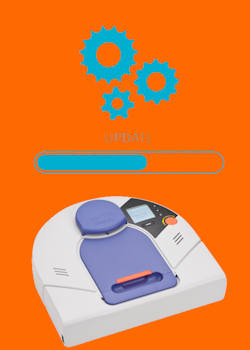
You’ve upgraded the battery. You've solved the charging station blinking green issue. You’ve fixed the Lidar. Your Neato XV is running like new. But what if I told you it’s still running with one hand tied behind its back?
In 2011, a German company called Vorwerk licensed the Neato XV design to create their own luxury robot, the Kobold VR100. It looked almost identical, but it cost three times as much. Why? Because it had Lithium batteries, a side brush, and—most importantly—superior software.
Since Neato shut down their official OTA servers in 2019, finding a working Neato firmware update tool has been impossible for most owners. But the community discovered a secret: With a simple Mini-USB cable and the right Neato offline update files, you can overwrite your robot's brain with German engineering.
Here is the definitive guide to the Vorwerk VR100 firmware for Neato hack.
Table of contents
Why Do This? The “Corner Cleaning” Secret
The standard Neato XV firmware is good. The Vorwerk firmware (specifically version 3.2) is aggressive. By flashing the Vorwerk firmware on a Neato XV-21 (or XV-11), you unlock:
- Corner Cleaning Mode: Standard Neatos cut corners to save time. The Vorwerk firmware makes the robot back into corners and wiggle, cleaning deeper than any US model was programmed to do.
- Faster Navigation: The German pathfinding algorithm is noticeably snappier.
- Increased Suction (Rumored): Many users report the fan spins up slightly higher on the “Turbo” setting found in the Vorwerk menu.
⚠️ The Danger Zone: Neato Binky vs Cruz Board
STOP. Before you download anything, you must check which motherboard your robot has. This is the difference between a “Neato Binky vs Cruz board.”
If you flash the wrong firmware, you might brick your robot.
- The “Cruz” Board (Rev 113): Found in older XV-11, XV-12, and early XV-21 models. This is the most hackable board. It loves the Vorwerk 3.2 update.
- The “Binky” Board (Rev 64): Found in newer XV-21 and “XV Signature” models. These usually ship with Neato firmware 3.4. DO NOT try to downgrade these to Vorwerk 3.2; you will cause errors.
How to Check:
On your robot’s LCD screen, go to: Menu > Support > Show Revision.
Look for Board Rev.
- If it says
113, proceed with the hack. - If it says
64, you are likely already running the latest Neato 3.4 firmware. You can't easily cross-flash, but you can re-flash 3.4 to fix corruption issues.


The Tools You Need
Since Neato shut down their update servers, the official “Neato Updater” tool no longer works. It tries to phone home and fails. You need the Neato offline firmware update files.
Downloads (see Neato XV software repository):
- A Mini-USB Cable (Note: NOT Micro-USB. The old, thick one used for PS3 controllers).
- Neato USB Drivers
- NeatoControl
- Neato/Vorwerk Offline Updater Tool
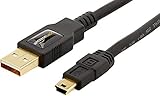
- IN THE BOX: (1) 3 foot high-speed USB 2.0 A-Male to Mini-B cable
- FOR SPEED CRITICAL DEVICES: Connects speed critical devices, such as external hard drives and smart phones, and peripherals that require a Mini-B connection to your computer
- GOLD-PLATED CONNECTORS: Constructed with corrosion-resistant, gold-plated connectors for optimal signal clarity and shielding to minimize interference
- BACKWARDS COMPATIBLE: Backwards compatible with USB 1.0
- FRUSTRATION FREE PACKAGING: Easy to open; shipped in Certified Frustration-Free Packaging

The Procedure: Flashing the Brain
Step 1: Install the Neato USB Driver (Windows 10/11)
Connect your Neato to your PC via the Mini-USB port (hidden under a rubber flap near the dust bin).
If your PC doesn't chime, or you don't see a new COM port in Device Manager, you need to install the legacy Neato USB driver.
(Note: Windows 10/11 users may need to “Disable Driver Signature Enforcement” to install these old drivers).
Step 2: Prepare the Robot
- Remove the robot from the charging base.
- Ensure the battery is at least 50% charged.
- Connect the USB cable. The robot's LCD should say “firmware update mode” or just blank out.
Step 3: Set your XV Neato as VR100
You need to temporarily mask your Neato XV robot as Vorwerk VR100 so that you can flash it with VR100 firmware. This makes the flushing process simple.
Run NeatoControl, then press Connect.
On the “Commands” Tab, enter and run the command “SetConfig ModelID VR100“
On the main tab, select “disconnect“, followed by “connect” – your Neato XV should appear as a VR100.
On the main tab, select “disconnect“, then exit NeatoControl.
Step 4: Run the Updater
Unzip the Neato/Vorwerk Offline Updater Tool v1.20 (for Rev 113 boards) and run it as Administrator.
The tool looks ancient, but it works.
- Select your Neato's COM port.
- Click Update.
- DO NOT TOUCH ANYTHING. The bar will crawl slowly. The robot might beep. The fan might twitch. This is normal.
Step 5: Set your Neato XV model name back
Run NeatoControl.exe again, and run the command “SetConfig ModelID XVXX” (replace XX with 11or 14 or 15 or 21, corresponding to your Neato XV model number).

Step 6: The Reboot
When the software says “Update Complete,” disconnect the USB cable.
The robot will reboot. When the screen comes back on, look closely.
Does the startup sound different? Does the menu look slightly different?
Congratulations. Your robot now speaks German (figuratively—you can set the language back to English in the menu).
Troubleshooting: “My Robot Won't Boot!”
If the update fails halfway, your robot might have a blank screen. Don't panic.
- The Hard Reset: Hold the Power button for 15 seconds until it fully shuts off.
- The “Safe Mode” Boot: Hold the Left Bumper while pressing the Power button. This forces the robot into a recovery mode where you can try flashing again.
The Verdict
Is it worth the risk? For owners of the older Rev 113 boards, absolutely. The navigation improvement alone gives the machine a second life. Plus, there is something satisfying about running “forbidden” software on a machine the manufacturer abandoned.
Now that your robot is fully restored—new battery, fixed Lidar, upgraded capacitors, and hacked firmware—how do you keep it running for another decade? In our next post, we compile the Ultimate Spare Parts Scavenger List.
Please let us know your questions in the comment box below, if you have any questions about updating your Neato XV with Vorwerk VR100 firmware.